 0c127039cf
Merge in DNS/adguard-home from new-client-dashboard to master Squashed commit of the following: commit 7bbd67c1e3d2af62b96bf41bb356cd6b784e473e Merge: 113743a69cd9054cAuthor: Vlad <v.abdulmyanov@adguard.com> Date: Wed Feb 3 16:01:17 2021 +0300 Merge branch 'master' into new-client-dashboard commit 113743a60665e40383d367dc17fa709dc54e4e2e Author: Vlad <v.abdulmyanov@adguard.com> Date: Wed Feb 3 15:45:16 2021 +0300 Remove unneded modal styles commit 04f9d93a9ac17ee046f0d5bedfb2bf5a5e6c0a48 Author: Vlad <v.abdulmyanov@adguard.com> Date: Wed Feb 3 14:19:56 2021 +0300 Consider comments commit 78a96cd8fed8b3e03547e7e45724c23db295f67b Author: Vlad <v.abdulmyanov@adguard.com> Date: Mon Feb 1 18:46:52 2021 +0300 Remove old params for MiniCssExtractPlugin commit 40e5a9b2b1e04036deb70af17f2719eadd0c9c02 Author: Vlad <v.abdulmyanov@adguard.com> Date: Mon Feb 1 18:27:46 2021 +0300 Fix mobile version commit 509cefc308f945b03cafa62bf48257490a0a4be1 Author: Vlad <v.abdulmyanov@adguard.com> Date: Mon Feb 1 18:20:56 2021 +0300 Remove unneeded imports commit d192f39cd2503b8ec942f00ba78fca02cac9fa60 Author: Vlad <v.abdulmyanov@adguard.com> Date: Mon Feb 1 18:20:13 2021 +0300 Finish first version of dashboard commit f82429e53d334874ff7dd0641092ec83c66ab61c Merge: fd91a0a33e0238aaAuthor: Vlad <v.abdulmyanov@adguard.com> Date: Mon Feb 1 17:12:59 2021 +0300 Merge branch 'master' into new-client-dashboard commit fd91a0a3d76c2a052a6548232b75d151d6065b88 Author: Vlad <v.abdulmyanov@adguard.com> Date: Mon Feb 1 17:12:27 2021 +0300 wip commit 237679965052d38acfcd6a72d24b2444cc5b3896 Author: Vlad <v.abdulmyanov@adguard.com> Date: Fri Jan 29 11:18:10 2021 +0300 Finish general settings commit 397a7e10efd34a8d31bb175a5a5a7158338388d4 Author: Vlad <v.abdulmyanov@adguard.com> Date: Thu Jan 28 19:24:03 2021 +0300 Add General settings page commit 486aaa6f3f9ad66f3a0dcfcccad9a32659767e90 Author: Vlad <v.abdulmyanov@adguard.com> Date: Thu Jan 28 14:05:16 2021 +0300 Remove husky commit b895306c0655019ca56ce161e050d83b4e7f5ff1 Merge: a195f1f4154c9c1cAuthor: Vlad <v.abdulmyanov@adguard.com> Date: Thu Jan 28 14:03:37 2021 +0300 Merge branch 'master' into new-client-dashboard commit a195f1f4d46043d9c53dea08734733f9817b95a0 Merge: c45c5fe9 362f390f Author: Vlad <v.abdulmyanov@adguard.com> Date: Wed Jan 27 15:46:18 2021 +0300 Merge branch 'new-client-dashboard' of ssh://bit.adguard.com:7999/dns/adguard-home into new-client-dashboard commit c45c5fe92e6c5c852bec8f512dc46b4cd513156c Author: Vlad <v.abdulmyanov@adguard.com> Date: Wed Jan 27 15:46:01 2021 +0300 wip commit 362f390fd3dcfca75633a8d30a2e54c3c30b4f3d Author: Vladislav Abdulmyanov <v.abdulmyanov@adguard.com> Date: Wed Jan 27 15:45:12 2021 +0300 Pull request #949: + client: add setup guide page Merge in DNS/adguard-home from 2554-setup-guide to new-client-dashboard Squashed commit of the following: commit c240d52e9e5d90429f2018fde808f4d04ccec138 Merge: 256f1056 137b88e4 Author: Ildar Kamalov <ik@adguard.com> Date: Wed Jan 27 14:13:52 2021 +0300 Merge branch 'new-client-dashboard' into 2554-setup-guide commit 256f1056770c67339e93275ab6dc7aaf2c10da0b Author: Ildar Kamalov <ik@adguard.com> Date: Wed Jan 27 14:10:45 2021 +0300 + client: add DNS addresses to the setup guide commit 0ecf91275a16ecc0dca23cae2ae209836fc622d2 Author: Ildar Kamalov <ik@adguard.com> Date: Wed Jan 27 14:00:12 2021 +0300 + client: add setup guide tabs commit 137b88e4253af5be32d542adbe74575ef74805c8 Author: Vlad <v.abdulmyanov@adguard.com> Date: Thu Jan 21 19:17:58 2021 +0300 Add clients top commit c3318e6932d87fdff5f22d76bee12b49f099129a Merge: 2776276b 021eb22f Author: Vlad <v.abdulmyanov@adguard.com> Date: Thu Jan 21 19:15:57 2021 +0300 Merge branch 'new-client-dashboard' of ssh://bit.adguard.com:7999/dns/adguard-home into new-client-dashboard commit 2776276b2e6dc026e1326b02c388fcf7d48d47ff Author: Vlad <v.abdulmyanov@adguard.com> Date: Thu Jan 21 19:15:53 2021 +0300 Add top client info commit 021eb22ff877aec12eb7fab60147a2cc2ddd08b7 Author: Ildar Kamalov <ik@adguard.com> Date: Thu Jan 21 14:13:54 2021 +0300 Merge: client: add sidebar Squashed commit of the following: commit 6885ba953971e68602889fbb3219221f90265421 Author: Ildar Kamalov <ik@adguard.com> Date: Thu Jan 21 13:56:55 2021 +0300 add sidebar mask commit f069bfe8cba2b31355e19a51ca00bf774ee9e560 Author: Ildar Kamalov <ik@adguard.com> Date: Thu Jan 21 13:03:47 2021 +0300 fix store commit 77c8791002887ae022da07dc264d9010576e7bab Merge: d0a6eff6 ea6d54d4 Author: Ildar Kamalov <ik@adguard.com> Date: Thu Jan 21 13:01:04 2021 +0300 Merge branch 'new-client-dashboard' into 2254-sidebar commit d0a6eff67fd74533d63f5d56382085e98ddbb702 Author: Ildar Kamalov <ik@adguard.com> Date: Thu Jan 21 12:47:32 2021 +0300 client: remove unused file commit 9d2424477de85503fe41fa00cc1294cb0c0e7dfa Author: Ildar Kamalov <ik@adguard.com> Date: Thu Jan 21 12:39:13 2021 +0300 client: header commit 9ddea19c136f15b184caa72d7e82738f7d4f3f1f Merge: 797f1248 b694bb05 Author: Ildar Kamalov <ik@adguard.com> Date: Thu Jan 21 10:57:24 2021 +0300 Merge branch 'new-client-dashboard' into 2254-sidebar commit 797f1248df5c1ef8e59c2a9999138f9e05a7adaa Author: Ildar Kamalov <ik@adguard.com> Date: Thu Jan 21 10:51:57 2021 +0300 client: sidebar ... and 14 more commits

Privacy protection center for you and your devices
Free and open source, powerful network-wide ads & trackers blocking DNS server.
AdGuard.com |
Wiki |
Reddit |
Twitter |
Telegram





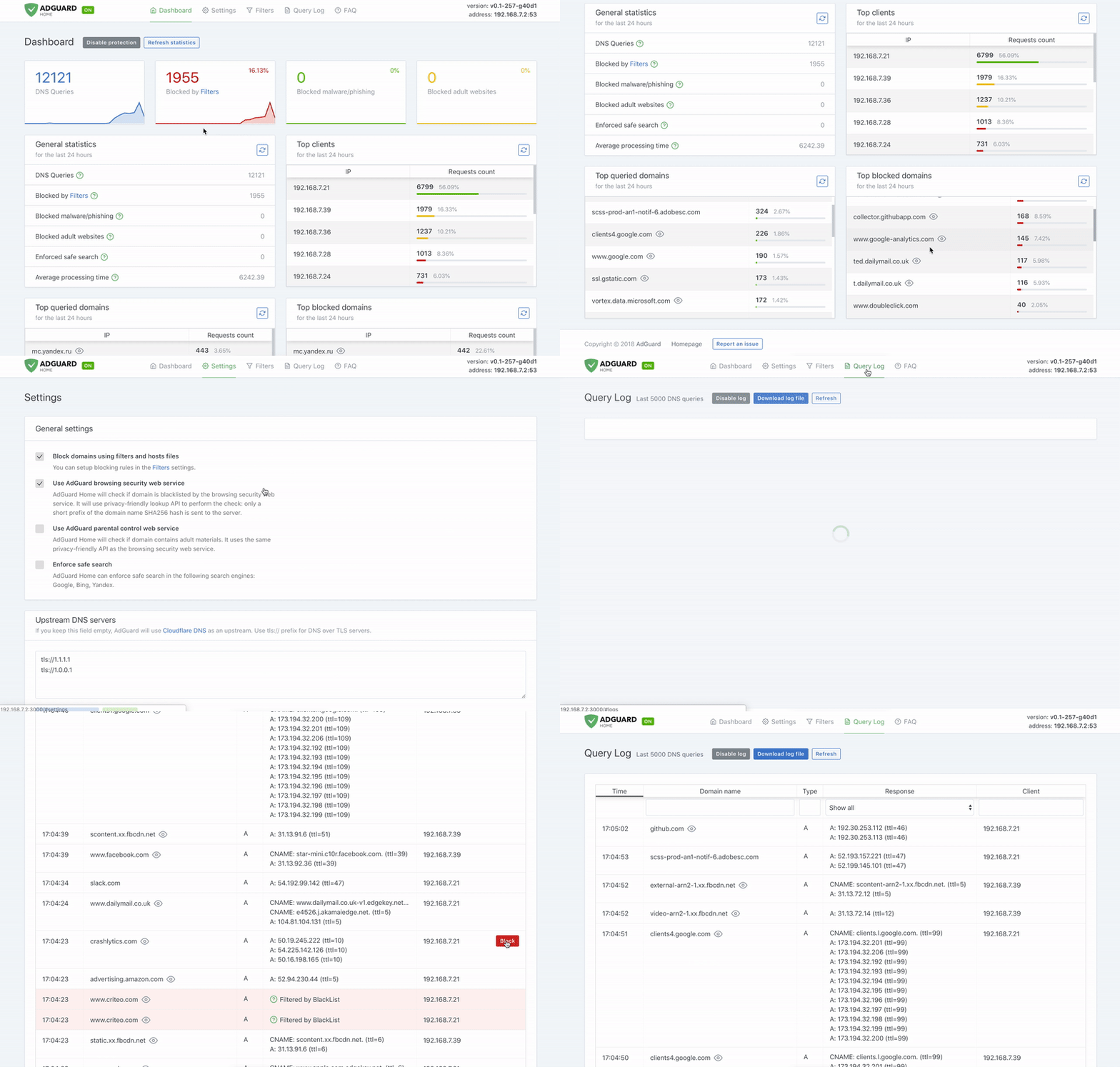
AdGuard Home is a network-wide software for blocking ads & tracking. After you set it up, it'll cover ALL your home devices, and you don't need any client-side software for that.
It operates as a DNS server that re-routes tracking domains to a "black hole", thus preventing your devices from connecting to those servers. It's based on software we use for our public AdGuard DNS servers -- both share a lot of common code.
- Getting Started
- Comparing AdGuard Home to other solutions
- How to build from source
- Contributing
- Projects that use AdGuard Home
- Acknowledgments
- Privacy
Getting Started
Automated install (Linux and Mac)
Run the following command in your terminal:
curl -sSL https://raw.githubusercontent.com/AdguardTeam/AdGuardHome/master/scripts/install.sh | sh
Alternative methods
Manual installation
Please read the Getting Started article on our Wiki to learn how to install AdGuard Home manually, and how to configure your devices to use it.
Docker
You can use our official Docker image.
Snap Store
If you're running Linux, there's a secure and easy way to install AdGuard Home - you can get it from the Snap Store.
Guides
- Getting Started
- Configuring AdGuard
- Installing AdGuard Home
- Verifying Releases
API
If you want to integrate with AdGuard Home, you can use our REST API. Alternatively, you can use this python client, which is used to build the AdGuard Home Hass.io Add-on.
Comparing AdGuard Home to other solutions
How is this different from public AdGuard DNS servers?
Running your own AdGuard Home server allows you to do much more than using a public DNS server. It's a completely different level. See for yourself:
- Choose what exactly will the server block or not block.
- Monitor your network activity.
- Add your own custom filtering rules.
- Most importantly, this is your own server, and you are the only one who's in control.
How does AdGuard Home compare to Pi-Hole
At this point, AdGuard Home has a lot in common with Pi-Hole. Both block ads and trackers using "DNS sinkholing" method, and both allow customizing what's blocked.
We're not going to stop here. DNS sinkholing is not a bad starting point, but this is just the beginning.
AdGuard Home provides a lot of features out-of-the-box with no need to install and configure additional software. We want it to be simple to the point when even casual users can set it up with minimal effort.
Disclaimer: some of the listed features can be added to Pi-Hole by installing additional software or by manually using SSH terminal and reconfiguring one of the utilities Pi-Hole consists of. However, in our opinion, this cannot be legitimately counted as a Pi-Hole's feature.
| Feature | AdGuard Home | Pi-Hole |
|---|---|---|
| Blocking ads and trackers | ✅ | ✅ |
| Customizing blocklists | ✅ | ✅ |
| Built-in DHCP server | ✅ | ✅ |
| HTTPS for the Admin interface | ✅ | Kind of, but you'll need to manually configure lighthttpd |
| Encrypted DNS upstream servers (DNS-over-HTTPS, DNS-over-TLS, DNSCrypt) | ✅ | ❌ (requires additional software) |
| Cross-platform | ✅ | ❌ (not natively, only via Docker) |
| Running as a DNS-over-HTTPS or DNS-over-TLS server | ✅ | ❌ (requires additional software) |
| Blocking phishing and malware domains | ✅ | ❌ (requires non-default blocklists) |
| Parental control (blocking adult domains) | ✅ | ❌ |
| Force Safe search on search engines | ✅ | ❌ |
| Per-client (device) configuration | ✅ | ✅ |
| Access settings (choose who can use AGH DNS) | ✅ | ❌ |
| Running without root privileges | ✅ | ❌ |
How does AdGuard Home compare to traditional ad blockers
It depends.
"DNS sinkholing" is capable of blocking a big percentage of ads, but it lacks flexibility and power of traditional ad blockers. You can get a good impression about the difference between these methods by reading this article. It compares AdGuard for Android (a traditional ad blocker) to hosts-level ad blockers (which are almost identical to DNS-based blockers in their capabilities).
However, this level of protection is enough for some users. Additionally, using a DNS-based blocker can help to block ads, tracking and analytics requests on other types of devices, such as SmartTVs, smart speakers or other kinds of IoT devices (on which you can't install tradtional ad blockers).
Known limitations
Here are some examples of what cannot be blocked by a DNS-level blocker:
- YouTube, Twitch ads
- Facebook, Twitter, Instagram sponsored posts
Essentially, any advertising that shares a domain with content cannot be blocked by a DNS-level blocker.
Is there a chance to handle this in the future? DNS will never be enough to do this. Our only option is to use a content blocking proxy like what we do in the standalone AdGuard applications. We're going to bring this feature support to AdGuard Home in the future. Unfortunately, even in this case, there still will be cases when this won't be enough or would require quite complicated configuration.
How to build from source
Prerequisites
Run make init to prepare the development environment.
You will need this to build AdGuard Home:
- go v1.14 or later.
- node.js v10.16.2 or later.
- npm v6.14 or later (temporary requirement, TODO: remove when redesign is finished).
- yarn v1.22.5 or later.
Building
Open Terminal and execute these commands:
git clone https://github.com/AdguardTeam/AdGuardHome
cd AdGuardHome
make
Check the Makefile to learn about other commands.
Building for a different platform. You can build AdGuard for any OS/ARCH just like any other Go project.
In order to do this, specify GOOS and GOARCH env variables before running make.
For example:
env GOOS='linux' GOARCH='arm64' make
Or:
make GOOS='linux' GOARCH='arm64'
Preparing release
You'll need this to prepare a release build:
Commands:
make build-release CHANNEL='...' VERSION='...'
Docker image
- Run
make build-dockerto build the Docker image locally (the one that we publish to DockerHub).
Please note, that we're using Docker Buildx to build our official image.
You may need to prepare before using these builds:
- (Linux-only) Install Qemu:
docker run --rm --privileged multiarch/qemu-user-static --reset -p yes --credential yes - Prepare builder:
docker buildx create --name buildx-builder --driver docker-container --use
Resources that we update periodically
scripts/translationsscripts/whotracksme
Contributing
You are welcome to fork this repository, make your changes and submit a pull request — https://github.com/AdguardTeam/AdGuardHome/pulls
Please note that we don't expect people to contribute to both UI and golang parts of the program simultaneously. Ideally, the golang part is implemented first, i.e. configuration, API, and the functionality itself. The UI part can be implemented later in a different pull request by a different person.
Test unstable versions
There are two update channels that you can use:
beta- beta version of AdGuard Home. More or less stable versions.edge- the newest version of AdGuard Home. New updates are pushed to this channel daily and it is the closest to the master branch you can get.
There are three options how you can install an unstable version:
- Snap Store -- look for "beta" and "edge" channels there.
- Docker Hub -- look for "beta" and "edge" tags there.
- Standalone builds. Use the automated installation script or look for the available builds below.
Beta:
curl -sSL https://raw.githubusercontent.com/AdguardTeam/AdGuardHome/master/scripts/install.sh | sh -s beta
Edge:
curl -sSL https://raw.githubusercontent.com/AdguardTeam/AdGuardHome/master/scripts/install.sh | sh -s edge
-
Beta channel builds
- Linux: 64-bit, 32-bit
- Linux ARM: 32-bit ARMv6 (recommended for Raspberry Pi), 64-bit, 32-bit ARMv5, 32-bit ARMv7
- Linux MIPS: 32-bit MIPS, 32-bit MIPSLE, 64-bit MIPS, 64-bit MIPSLE
- Windows: 64-bit, 32-bit
- MacOS: 64-bit, 32-bit
- FreeBSD: 64-bit, 32-bit
- FreeBSD ARM: 64-bit, 32-bit ARMv5, 32-bit ARMv6, 32-bit ARMv7
-
Edge channel builds
- Linux: 64-bit, 32-bit
- Linux ARM: 32-bit ARMv6 (recommended for Raspberry Pi), 64-bit, 32-bit ARMv5, 32-bit ARMv7
- Linux MIPS: 32-bit MIPS, 32-bit MIPSLE, 64-bit MIPS, 64-bit MIPSLE
- Windows: 64-bit, 32-bit
- MacOS: 64-bit, 32-bit
- FreeBSD: 64-bit, 32-bit
- FreeBSD ARM: 64-bit, 32-bit ARMv5, 32-bit ARMv6, 32-bit ARMv7
Report issues
If you run into any problem or have a suggestion, head to this page and click on the New issue button.
Help with translations
If you want to help with AdGuard Home translations, please learn more about translating AdGuard products here: https://kb.adguard.com/en/general/adguard-translations
Here is a link to AdGuard Home project: https://crowdin.com/project/adguard-applications/en#/adguard-home
Other
Here's what you can also do to contribute:
- Look for issues marked as "help wanted".
- Actualize the list of Blocked services. It it can be found in dnsfilter/blocked_services.go.
- Actualize the list of known trackers. It it can be found in client/src/helpers/trackers/adguard.json.
- Actualize the list of vetted blocklists. It it can be found in client/src/helpers/filters/filters.json.
Projects that use AdGuard Home
- Python library (https://github.com/frenck/python-adguardhome)
- Hass.io add-on (https://github.com/hassio-addons/addon-adguard-home)
- OpenWrt LUCI app (https://github.com/kongfl888/luci-app-adguardhome)
- Prometheus exporter for AdGuard Home (https://github.com/ebrianne/adguard-exporter)
Acknowledgments
This software wouldn't have been possible without:
- Go and it's libraries:
- Node.js and it's libraries:
- whotracks.me data
You might have seen that CoreDNS was mentioned here before — we've stopped using it in AdGuard Home. While we still use it on our servers for AdGuard DNS service, it seemed like an overkill for Home as it impeded with Home features that we plan to implement.
For a full list of all node.js packages in use, please take a look at client/package.json file.
Privacy
Our main idea is that you are the one, who should be in control of your data. So it is only natural, that AdGuard Home does not collect any usage statistics, and does not use any web services unless you configure it to do so. Full policy with every bit that could in theory be sent by AdGuard Home is available here.