 306c1983a2
Merge in DNS/adguard-home from 1472-edns-custom-ip-api to master Updates #1472 Squashed commit of the following: commit 7605ec5bd5467ddd28a650385193eb2332653bb6 Merge: 8b2ac227194ead34Author: Stanislav Chzhen <s.chzhen@adguard.com> Date: Wed Mar 22 13:39:25 2023 +0300 Merge branch 'master' into 1472-edns-custom-ip-api commit 8b2ac22793a51d2555d32c1f5b5c118118807d1f Merge: d5ca8b6ec3edab43Author: Stanislav Chzhen <s.chzhen@adguard.com> Date: Tue Mar 21 18:26:55 2023 +0300 Merge branch 'master' into 1472-edns-custom-ip-api commit d5ca8b6e1d87480d4ee4afd346e6bf04907fca95 Author: Stanislav Chzhen <s.chzhen@adguard.com> Date: Tue Mar 21 18:26:24 2023 +0300 dnsforward: imp tests commit 1302586d22812c22755ea1c7e7fcd32330d707c5 Author: Vladislav Abdulmyanov <v.abdulmyanov@adguard.com> Date: Tue Mar 21 16:47:56 2023 +0200 client: change validation for custom edns ip commit 44e4dc6d1e47de6597ed9ee328db9639e38b4868 Author: Vladislav Abdulmyanov <v.abdulmyanov@adguard.com> Date: Tue Mar 21 16:31:42 2023 +0200 client: implement edns custom ip commit 8a3e7ad8ebf16262818821340da23baa5f004bff Merge: 04ac1112f736d85eAuthor: Stanislav Chzhen <s.chzhen@adguard.com> Date: Tue Mar 21 15:04:40 2023 +0300 Merge branch 'master' into 1472-edns-custom-ip-api commit 04ac1112dda2e778243555b2f54819e5ba586e05 Author: Stanislav Chzhen <s.chzhen@adguard.com> Date: Tue Mar 21 15:03:39 2023 +0300 dnsforward: imp tests commit b44f6d0ccb3ba7b7a5be07c9cf293dad9c83c794 Merge: 19c6851e48431f8bAuthor: Stanislav Chzhen <s.chzhen@adguard.com> Date: Mon Mar 20 17:55:49 2023 +0300 Merge branch 'master' into 1472-edns-custom-ip-api commit 19c6851e30f30b0572334822e8639e03760de986 Author: Stanislav Chzhen <s.chzhen@adguard.com> Date: Fri Mar 10 10:40:15 2023 +0300 all: fix chlog commit 6dcdcbd666ebf3a56a38251e8ead09c605068ce3 Merge: a7f1bf71a2053526Author: Stanislav Chzhen <s.chzhen@adguard.com> Date: Fri Mar 10 10:23:37 2023 +0300 Merge branch 'master' into 1472-edns-custom-ip-api commit a7f1bf715e3557c710b700b9bd923868eb07715b Author: Stanislav Chzhen <s.chzhen@adguard.com> Date: Tue Mar 7 19:24:18 2023 +0300 home: fix default value commit 0311a9bb6571975963d747ef4ef427b59dca03bc Merge: 7e0bb3df1011b8f9Author: Stanislav Chzhen <s.chzhen@adguard.com> Date: Tue Mar 7 19:04:18 2023 +0300 Merge branch 'master' into 1472-edns-custom-ip-api commit 7e0bb3df78f10f4b4ae0fd49681d1aa0040521c5 Author: Stanislav Chzhen <s.chzhen@adguard.com> Date: Tue Mar 7 19:03:24 2023 +0300 all: fix chlog commit 202d7ccf4721ccf39726da01d237e07317bfaa58 Author: Stanislav Chzhen <s.chzhen@adguard.com> Date: Tue Mar 7 11:35:41 2023 +0300 dnsforward: fix typo commit fe95e003a0c3b316a44b5ec0b848a60ddd4c85cf Author: Stanislav Chzhen <s.chzhen@adguard.com> Date: Tue Mar 7 11:28:21 2023 +0300 all: fix docs commit 66835a9aa22b3015f9238c1d6f5aa9bd6067db8a Author: Stanislav Chzhen <s.chzhen@adguard.com> Date: Tue Mar 7 10:48:08 2023 +0300 dnsforward: add todo commit b58255e1e6660a8229bb9c40f2acddebb3dbdc66 Author: Stanislav Chzhen <s.chzhen@adguard.com> Date: Mon Mar 6 15:40:02 2023 +0300 all: upd chlog commit 9b2be7facba30c815144e08a7835353cad14c405 Author: Stanislav Chzhen <s.chzhen@adguard.com> Date: Fri Mar 3 11:22:19 2023 +0300 dnsforward: edns custom ip api

Privacy protection center for you and your devices
Free and open source, powerful network-wide ads & trackers blocking DNS server.
AdGuard.com |
Wiki |
Reddit |
Twitter |
Telegram




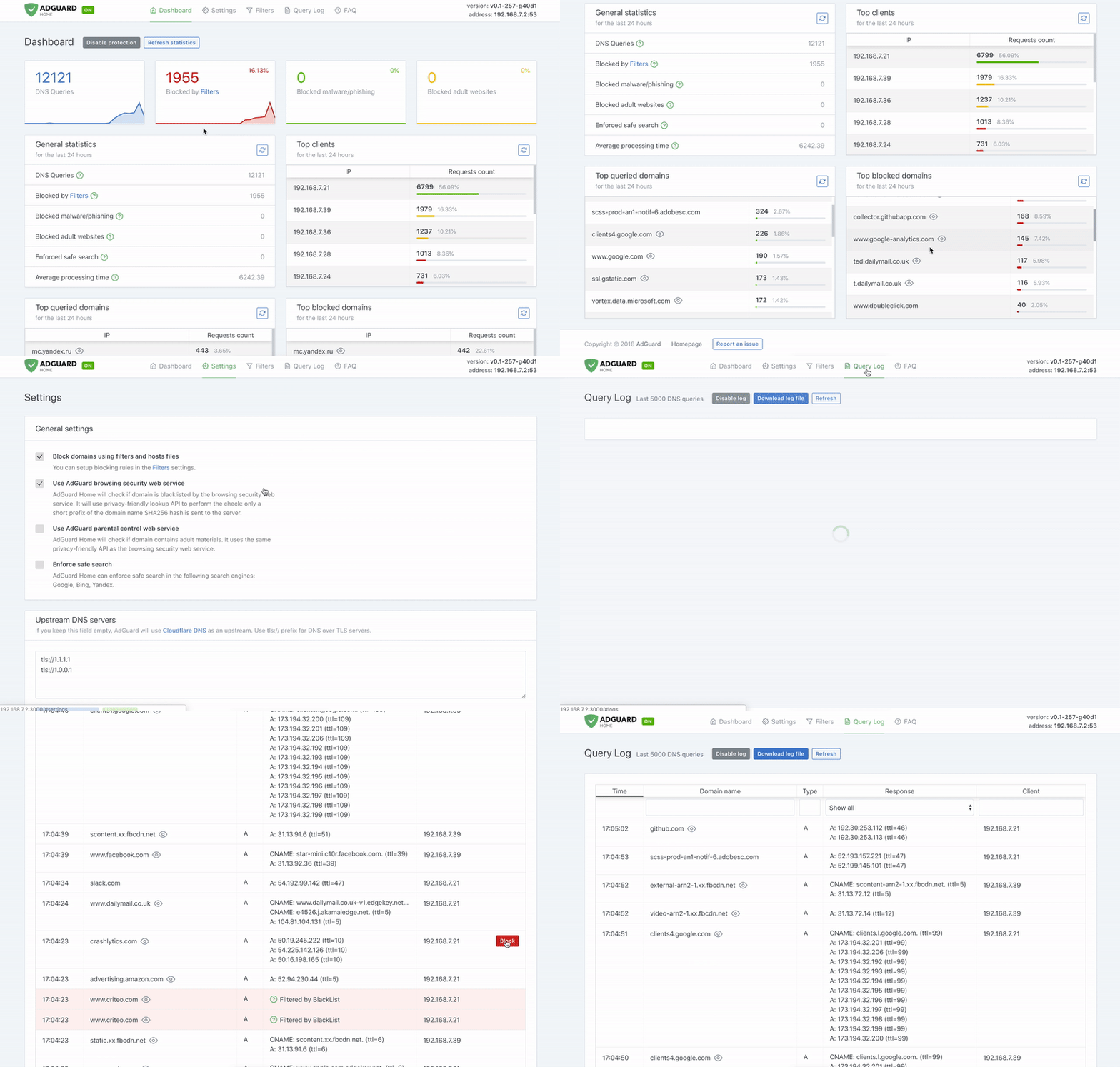
AdGuard Home is a network-wide software for blocking ads and tracking. After you set it up, it'll cover ALL your home devices, and you don't need any client-side software for that.
It operates as a DNS server that re-routes tracking domains to a “black hole”, thus preventing your devices from connecting to those servers. It's based on software we use for our public AdGuard DNS servers, and both share a lot of code.
- Getting Started
- Comparing AdGuard Home to other solutions
- How to build from source
- Contributing
- Projects that use AdGuard Home
- Acknowledgments
- Privacy
Getting Started
Automated install (Unix)
To install with curl run the following command:
curl -s -S -L https://raw.githubusercontent.com/AdguardTeam/AdGuardHome/master/scripts/install.sh | sh -s -- -v
To install with wget run the following command:
wget --no-verbose -O - https://raw.githubusercontent.com/AdguardTeam/AdGuardHome/master/scripts/install.sh | sh -s -- -v
To install with fetch run the following command:
fetch -o - https://raw.githubusercontent.com/AdguardTeam/AdGuardHome/master/scripts/install.sh | sh -s -- -v
The script also accepts some options:
-c <channel>to use specified channel;-rto reinstall AdGuard Home;-uto uninstall AdGuard Home;-vfor verbose output.
Note that options -r and -u are mutually exclusive.
Alternative methods
Manual installation
Please read the Getting Started article on our Wiki to learn how to install AdGuard Home manually, and how to configure your devices to use it.
Docker
You can use our official Docker image on Docker Hub.
Snap Store
If you're running Linux, there's a secure and easy way to install AdGuard Home: get it from the Snap Store.
Guides
See our Wiki.
API
If you want to integrate with AdGuard Home, you can use our REST API. Alternatively, you can use this python client, which is used to build the AdGuard Home Hass.io Add-on.
Comparing AdGuard Home to other solutions
How is this different from public AdGuard DNS servers?
Running your own AdGuard Home server allows you to do much more than using a public DNS server. It's a completely different level. See for yourself:
-
Choose what exactly the server blocks and permits.
-
Monitor your network activity.
-
Add your own custom filtering rules.
-
Most importantly, it's your own server, and you are the only one who's in control.
How does AdGuard Home compare to Pi-Hole
At this point, AdGuard Home has a lot in common with Pi-Hole. Both block ads and trackers using the so-called “DNS sinkholing” method and both allow customizing what's blocked.
AdGuard Home provides a lot of features out-of-the-box with no need to install and configure additional software. We want it to be simple to the point when even casual users can set it up with minimal effort.
Disclaimer: some of the listed features can be added to Pi-Hole by installing additional software or by manually using SSH terminal and reconfiguring one of the utilities Pi-Hole consists of. However, in our opinion, this cannot be legitimately counted as a Pi-Hole's feature.
| Feature | AdGuard Home | Pi-Hole |
|---|---|---|
| Blocking ads and trackers | ✅ | ✅ |
| Customizing blocklists | ✅ | ✅ |
| Built-in DHCP server | ✅ | ✅ |
| HTTPS for the Admin interface | ✅ | Kind of, but you'll need to manually configure lighttpd |
| Encrypted DNS upstream servers (DNS-over-HTTPS, DNS-over-TLS, DNSCrypt) | ✅ | ❌ (requires additional software) |
| Cross-platform | ✅ | ❌ (not natively, only via Docker) |
| Running as a DNS-over-HTTPS or DNS-over-TLS server | ✅ | ❌ (requires additional software) |
| Blocking phishing and malware domains | ✅ | ❌ (requires non-default blocklists) |
| Parental control (blocking adult domains) | ✅ | ❌ |
| Force Safe search on search engines | ✅ | ❌ |
| Per-client (device) configuration | ✅ | ✅ |
| Access settings (choose who can use AGH DNS) | ✅ | ❌ |
| Running without root privileges | ✅ | ❌ |
How does AdGuard Home compare to traditional ad blockers
It depends.
DNS sinkholing is capable of blocking a big percentage of ads, but it lacks the flexibility and the power of traditional ad blockers. You can get a good impression about the difference between these methods by reading this article, which compares AdGuard for Android (a traditional ad blocker) to hosts-level ad blockers (which are almost identical to DNS-based blockers in their capabilities). This level of protection is enough for some users.
Additionally, using a DNS-based blocker can help to block ads, tracking and analytics requests on other types of devices, such as SmartTVs, smart speakers or other kinds of IoT devices (on which you can't install traditional ad blockers).
Known limitations
Here are some examples of what cannot be blocked by a DNS-level blocker:
-
YouTube, Twitch ads;
-
Facebook, Twitter, Instagram sponsored posts.
Essentially, any advertising that shares a domain with content cannot be blocked by a DNS-level blocker.
Is there a chance to handle this in the future? DNS will never be enough to do this. Our only option is to use a content blocking proxy like what we do in the standalone AdGuard applications. We're going to bring this feature support to AdGuard Home in the future. Unfortunately, even in this case, there still will be cases when this won't be enough or would require quite a complicated configuration.
How to build from source
Prerequisites
Run make init to prepare the development environment.
You will need this to build AdGuard Home:
Building
Open your terminal and execute these commands:
git clone https://github.com/AdguardTeam/AdGuardHome
cd AdGuardHome
make
NOTE: The non-standard -j flag is currently not supported, so building
with make -j 4 or setting your MAKEFLAGS to include, for example, -j 4 is
likely to break the build. If you do have your MAKEFLAGS set to that, and you
don't want to change it, you can override it by running make -j 1.
Check the Makefile to learn about other commands.
Building for a different platform
You can build AdGuard Home for any OS/ARCH that Go supports. In order to do
this, specify GOOS and GOARCH environment variables as macros when running
make.
For example:
env GOOS='linux' GOARCH='arm64' make
or:
make GOOS='linux' GOARCH='arm64'
Preparing releases
You'll need snapcraft to prepare a release build. Once installed, run the
following command:
make build-release CHANNEL='...' VERSION='...'
See the build-release target documentation.
Docker image
Run make build-docker to build the Docker image locally (the one that we
publish to DockerHub). Please note, that we're using Docker Buildx to
build our official image.
You may need to prepare before using these builds:
-
(Linux-only) Install Qemu:
docker run --rm --privileged multiarch/qemu-user-static --reset -p yes --credential yes -
Prepare the builder:
docker buildx create --name buildx-builder --driver docker-container --use
See the build-docker target documentation.
Debugging the frontend
When you need to debug the frontend without recompiling the production version every time, for example to check how your labels would look on a form, you can run the frontend build a development environment.
-
In a separate terminal, run:
( cd ./client/ && env NODE_ENV='development' npm run watch ) -
Run your
AdGuardHomebinary with the--local-frontendflag, which instructs AdGuard Home to ignore the built-in frontend files and use those from the./build/directory. -
Now any changes you make in the
./client/directory should be recompiled and become available on the web UI. Make sure that you disable the browser cache to make sure that you actually get the recompiled version.
Contributing
You are welcome to fork this repository, make your changes and submit a pull request. Please make sure you follow our code guidelines though.
Please note that we don't expect people to contribute to both UI and backend parts of the program simultaneously. Ideally, the backend part is implemented first, i.e. configuration, API, and the functionality itself. The UI part can be implemented later in a different pull request by a different person.
Test unstable versions
There are two update channels that you can use:
-
beta: beta versions of AdGuard Home. More or less stable versions, usually released every two weeks or more often. -
edge: the newest version of AdGuard Home from the development branch. New updates are pushed to this channel daily.
There are three options how you can install an unstable version:
-
Snap Store: look for the
betaandedgechannels. -
Docker Hub: look for the
betaandedgetags. -
Standalone builds. Use the automated installation script or look for the available builds on the Wiki.
Script to install a beta version:
curl -s -S -L https://raw.githubusercontent.com/AdguardTeam/AdGuardHome/master/scripts/install.sh | sh -s -- -c betaScript to install an edge version:
curl -s -S -L https://raw.githubusercontent.com/AdguardTeam/AdGuardHome/master/scripts/install.sh | sh -s -- -c edge
Report issues
If you run into any problem or have a suggestion, head to this page and click on the “New issue” button.
Help with translations
If you want to help with AdGuard Home translations, please learn more about translating AdGuard products in our Knowledge Base. You can contribute to the AdGuardHome project on CrowdIn.
Other
Another way you can contribute is by looking for issues marked as
help wanted, asking if the issue is up for grabs, and sending a PR fixing the
bug or implementing the feature.
Projects that use AdGuard Home
-
AdGuard Home Remote: iOS app by Joost.
-
OpenWrt LUCI app by @kongfl888 (originally by @rufengsuixing).
-
Asuswrt-Merlin-AdGuardHome-Installer by @jumpsmm7 aka @SomeWhereOverTheRainBow.
Acknowledgments
This software wouldn't have been possible without:
- Go and its libraries:
- Node.js and its libraries:
- whotracks.me data
You might have seen that CoreDNS was mentioned here before, but we've stopped using it in AdGuard Home.
For the full list of all Node.js packages in use, please take a look at
client/package.json file.
Privacy
Our main idea is that you are the one, who should be in control of your data. So it is only natural, that AdGuard Home does not collect any usage statistics, and does not use any web services unless you configure it to do so. See also the full privacy policy with every bit that could in theory be sent by AdGuard Home is available.