 e39fe1b913
Full rework of the query log Squashed commit of the following: commit e8a72eb223551f17e637136713dae03accf8ab9e Author: Andrey Meshkov <am@adguard.com> Date: Thu Jun 18 00:31:53 2020 +0300 fix race in whois test commit 801d28197f888fa21f83c9a0b49e3c9472c08513 Merge: 9d9787fdb1c951fbAuthor: Andrey Meshkov <am@adguard.com> Date: Thu Jun 18 00:28:13 2020 +0300 Merge branch 'master' into feature/1421 commit 9d9787fd79b17f76c7baed52c12ac462fd00a5e4 Merge: 4ce337ca 08e238ab Author: Andrey Meshkov <am@adguard.com> Date: Thu Jun 18 00:27:32 2020 +0300 Merge commit 4ce337ca7aec163edf87a038bb25fb44e64f8613 Author: Andrey Meshkov <am@adguard.com> Date: Thu Jun 18 00:22:49 2020 +0300 -(home): fix whois test commit 08e238ab0e723b1e354f58245e9a8d5017b392c9 Author: ArtemBaskal <a.baskal@adguard.com> Date: Thu Jun 18 00:13:41 2020 +0300 Add comments commit 5f108065952bcc25dce1c2eee3f9401d2641a6e9 Author: ArtemBaskal <a.baskal@adguard.com> Date: Wed Jun 17 23:47:50 2020 +0300 Make tooltip position absolute for touch commit 4c30a583165e5d007d4b01b657de8751a7bd8c7b Author: ArtemBaskal <a.baskal@adguard.com> Date: Wed Jun 17 20:39:44 2020 +0300 Prevent scroll hide for touch devices commit 62da97931f5921613762614717c62c77ddb6b8db Author: ArtemBaskal <a.baskal@adguard.com> Date: Wed Jun 17 20:06:24 2020 +0300 Review changes: ipad tooltip commit 12dddcca8caca51c157b5d25dfa3ca03ba7f0c06 Author: ArtemBaskal <a.baskal@adguard.com> Date: Wed Jun 17 16:59:16 2020 +0300 Add close tooltip event for ipad commit 62191e41d5bf67317f9f1dc6c6af08cbabb4bf90 Author: ArtemBaskal <a.baskal@adguard.com> Date: Wed Jun 17 16:39:40 2020 +0300 Add success toast on logs refresh commit 2ebdd6a8124269d737c8060c3247aaf35d85cb8b Author: ArtemBaskal <a.baskal@adguard.com> Date: Wed Jun 17 16:01:37 2020 +0300 Fix pagination commit 5820c92bacd93d05a3d66d42ee95f099e1c5d9e9 Author: ArtemBaskal <a.baskal@adguard.com> Date: Wed Jun 17 11:31:15 2020 +0300 Revert "Render table in chunks" This reverts commit cdfcd849ccddc1bc35591edac7904129431470c9. commit cdfcd849ccddc1bc35591edac7904129431470c9 Author: ArtemBaskal <a.baskal@adguard.com> Date: Tue Jun 16 18:42:18 2020 +0300 Render table in chunks commit cc8c5e64274bf6e806e2e8a4bf305af745c3ed2a Author: ArtemBaskal <a.baskal@adguard.com> Date: Tue Jun 16 17:35:24 2020 +0300 Add pagination button hover effect commit f7e134091a1556784a5fea9d83c50353536126ef Author: ArtemBaskal <a.baskal@adguard.com> Date: Tue Jun 16 16:28:00 2020 +0300 Make loader position absolute commit a7b887b57d903f1f7ac967b861b5cc677728efc4 Author: ArtemBaskal <a.baskal@adguard.com> Date: Tue Jun 16 15:42:20 2020 +0300 Ignore clients find without params commit ecb322fefd4a161d79f28d17fe27827ee91701e4 Author: ArtemBaskal <a.baskal@adguard.com> Date: Tue Jun 16 15:30:48 2020 +0300 Styles changes commit 9323ce3938bf04e1290eade09201ba0790a250c0 Author: ArtemBaskal <a.baskal@adguard.com> Date: Tue Jun 16 14:32:23 2020 +0300 Review styles changes commit e0faa04ba3643f01b2ca99524cdd52b0731725c7 Merge: 9857682315e71435Author: ArtemBaskal <a.baskal@adguard.com> Date: Tue Jun 16 12:08:45 2020 +0300 Merge branch '1421-new-qlog-v2' into feature/1421 commit 9857682371e8d9a3a91933cfb58a26b3470675d9 Author: ArtemBaskal <a.baskal@adguard.com> Date: Mon Jun 15 18:32:02 2020 +0300 Fix response cell ... and 88 more commits

Privacy protection center for you and your devices
Free and open source, powerful network-wide ads & trackers blocking DNS server.
AdGuard.com |
Wiki |
Reddit |
Twitter |
Telegram






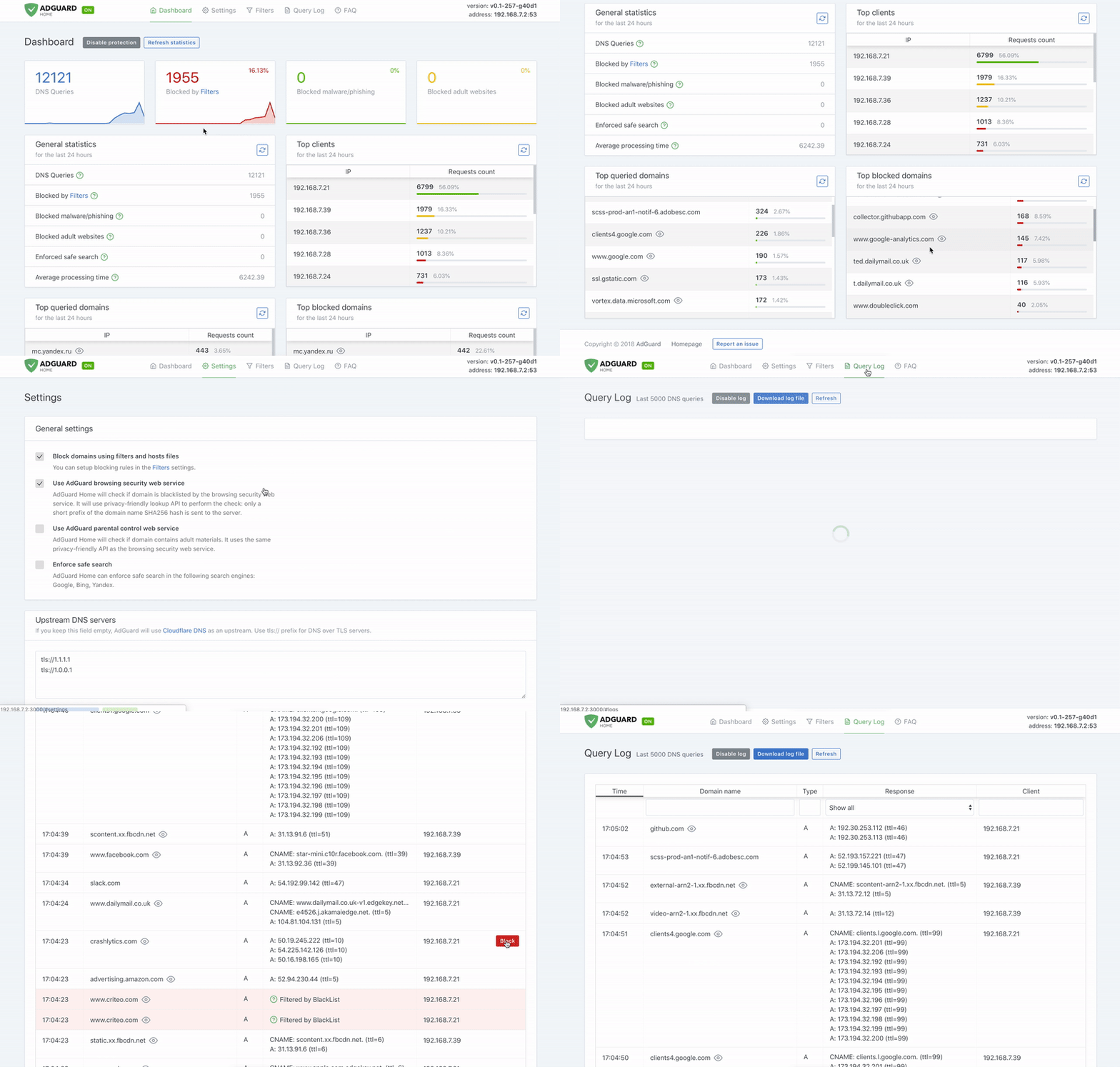
AdGuard Home is a network-wide software for blocking ads & tracking. After you set it up, it'll cover ALL your home devices, and you don't need any client-side software for that.
It operates as a DNS server that re-routes tracking domains to a "black hole," thus preventing your devices from connecting to those servers. It's based on software we use for our public AdGuard DNS servers -- both share a lot of common code.
- Getting Started
- Comparing AdGuard Home to other solutions
- How to build from source
- Contributing
- Projects that use AdGuardHome
- Acknowledgments
Getting Started
Please read the Getting Started article on our Wiki to learn how to install AdGuard Home, and how to configure your devices to use it.
If you're running Linux, there's a secure and easy way to install AdGuard Home - you can get it from the Snap Store.
Alternatively, you can use our official Docker image.
Guides
- Configuration
- AdGuard Home as a DNS-over-HTTPS or DNS-over-TLS server
- How to install and run AdGuard Home on Raspberry Pi
- How to install and run AdGuard Home on a Virtual Private Server
- How to write your own hosts blocklists properly
API
If you want to integrate with AdGuard Home, you can use our REST API. Alternatively, you can use this python client, which is used to build the AdGuard Home Hass.io Add-on.
Comparing AdGuard Home to other solutions
How is this different from public AdGuard DNS servers?
Running your own AdGuard Home server allows you to do much more than using a public DNS server. It's a completely different level. See for yourself:
- Choose what exactly will the server block or not block.
- Monitor your network activity.
- Add your own custom filtering rules.
- Most importantly, this is your own server, and you are the only one who's in control.
How does AdGuard Home compare to Pi-Hole
At this point, AdGuard Home has a lot in common with Pi-Hole. Both block ads and trackers using "DNS sinkholing" method, and both allow customizing what's blocked.
We're not going to stop here. DNS sinkholing is not a bad starting point, but this is just the beginning.
AdGuard Home provides a lot of features out-of-the-box with no need to install and configure additional software. We want it to be simple to the point when even casual users can set it up with minimal effort.
Disclaimer: some of the listed features can be added to Pi-Hole by installing additional software or by manually using SSH terminal and reconfiguring one of the utilities Pi-Hole consists of. However, in our opinion, this cannot be legitimately counted as a Pi-Hole's feature.
| Feature | AdGuard Home | Pi-Hole |
|---|---|---|
| Blocking ads and trackers | ✅ | ✅ |
| Customizing blocklists | ✅ | ✅ |
| Built-in DHCP server | ✅ | ✅ |
| HTTPS for the Admin interface | ✅ | Kind of, but you'll need to manually configure lighthttpd |
| Encrypted DNS upstream servers (DNS-over-HTTPS, DNS-over-TLS, DNSCrypt) | ✅ | ❌ (requires additional software) |
| Cross-platform | ✅ | ❌ (not natively, only via Docker) |
| Running as a DNS-over-HTTPS or DNS-over-TLS server | ✅ | ❌ (requires additional software) |
| Blocking phishing and malware domains | ✅ | ❌ (requires non-default blocklists) |
| Parental control (blocking adult domains) | ✅ | ❌ |
| Force Safe search on search engines | ✅ | ❌ |
| Per-client (device) configuration | ✅ | ✅ |
| Access settings (choose who can use AGH DNS) | ✅ | ❌ |
How does AdGuard Home compare to traditional ad blockers
It depends.
"DNS sinkholing" is capable of blocking a big percentage of ads, but it lacks flexibility and power of traditional ad blockers. You can get a good impression about the difference between these methods by reading this article. It compares AdGuard for Android (a traditional ad blocker) to hosts-level ad blockers (which are almost identical to DNS-based blockers in their capabilities). However, this level of protection is enough for some users. Additionally, using a DNS-based blocker can help to block ads, tracking and analytics requests on other types of devices, such as SmartTVs, smart speakers or other kinds of IoT devices (on which you can't install tradtional ad blockers).
How to build from source
Prerequisites
You will need:
You can either install them via the provided links or use brew.sh if you're on Mac:
brew install go node
Building
Open Terminal and execute these commands:
git clone https://github.com/AdguardTeam/AdGuardHome
cd AdGuardHome
make
(For devs) Upload translations
node upload.js
(For devs) Download translations
node download.js
Contributing
You are welcome to fork this repository, make your changes and submit a pull request — https://github.com/AdguardTeam/AdGuardHome/pulls
Test unstable versions
There are three options how you can install an unstable version.
- You can either install a beta version of AdGuard Home which we update periodically.
- You can use the Docker image from the
edgetag, which is synced with the repo master branch. - You can install AdGuard Home from
betaoredgechannels on the Snap Store.
- Beta builds
- Docker Hub
- Snap Store
Report issues
If you run into any problem or have a suggestion, head to this page and click on the New issue button.
Help with translations
If you want to help with AdGuard Home translations, please learn more about translating AdGuard products here: https://kb.adguard.com/en/general/adguard-translations
Here is a link to AdGuard Home project: https://crowdin.com/project/adguard-applications/en#/adguard-home
Projects that use AdGuardHome
- Python library (https://github.com/frenck/python-adguardhome)
- Hass.io add-on (https://github.com/hassio-addons/addon-adguard-home)
- OpenWrt LUCI app (https://github.com/rufengsuixing/luci-app-adguardhome)
Acknowledgments
This software wouldn't have been possible without:
- Go and it's libraries:
- Node.js and it's libraries:
- whotracks.me data
You might have seen that CoreDNS was mentioned here before — we've stopped using it in AdGuardHome. While we still use it on our servers for AdGuard DNS service, it seemed like an overkill for Home as it impeded with Home features that we plan to implement.
For a full list of all node.js packages in use, please take a look at client/package.json file.
For info on which exact domains that are blocked by the Blocked services function, it can be found at dnsfilter/blocked_services.go